Posts

1. Understand Machine/Computer
Image
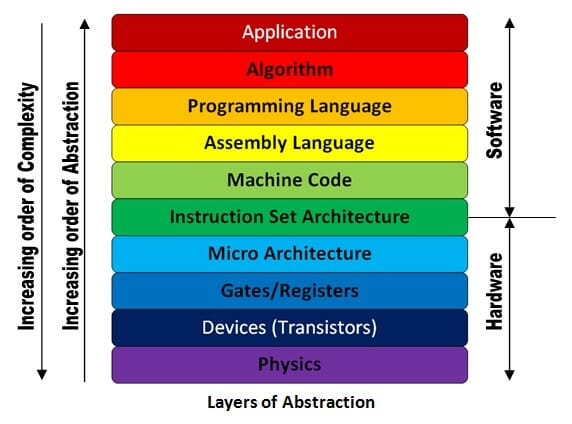
  1. Understand Machine/Computer What is Machine The computer is machine and machine is something that takes input, process and then give us output.  E.g. Water heater is machine which takes water as input and gives us hot water.  Sugarcane juice machine takes sugarcane and gives us Juice and waste as output.       Computer is also a machine that takes input from user and displays output on screen. But the heart of computer the CPU takes electricity as input and gives us back electricity.  We convert electricity into screen and show output.  Input to computer is given using Keyboard/mouse or other human operatable devices. These device convert human input to electricity and provide it as input to CPU.  Lot of hardware/software take place in between human and CUP.  Hiding the complexities of hardware from the user. Managing between the hardware's resources which include the processors, memory, data storage and I/O devices. Handling "...

MS Sql server on ubuntu

 --> Adding Repo echo Adding Microsoft repositories... sudo curl https://packages.microsoft.com/keys/microsoft.asc | sudo apt-key add - repoargs= " $(curl https://packages.microsoft.com/config/ubuntu/16.04/mssql-server-2017.list) " sudo add-apt-repository " ${repoargs} " repoargs= " $(curl https://packages.microsoft.com/config/ubuntu/16.04/prod.list) " sudo add-apt-repository " ${repoargs} " echo Running apt-get update -y... sudo apt-get update -y --> Installing MSSQL Prereq http://security.ubuntu.com/ubuntu/pool/main/o/openssl1.0/libssl1.0.0_1.0.2n-1ubuntu5.6_amd64.deb dpkg -i libssl1.0.0_1.0.2n-1ubuntu5.6_amd64.deb wget http://ftp.osuosl.org/pub/ubuntu/pool/universe/j/jemalloc/libjemalloc1_3.6.0-11_amd64.deb sudo dpkg -i libjemalloc1_3.6.0-11_amd64.deb --> Install MSSQl sudo apt install mssql-server echo Running mssql-conf setup... sudo MSSQL_SA_PASSWORD="Mlinfotech@321" \ MSSQL_PID=" evaluation" \ ...

Install OPEN VPN

                 mkdir vpninstall     8  cd vpninstall/     9  curl -O https://raw.githubusercontent.com/angristan/openvpn-install/master/openvpn-install.sh    10  chmod +x openvpn-install.sh    11  ./openvpn-install.sh     12  sudo ./openvpn-install.sh     13  ls    14  cd    15  ls    16  vim hemant.ovpn     17  sudo apt install nodejs    18  sudo apt install npm    19  npm i -g http-server    20  sudo npm i -g http-server    21  http-server     22  http-server -p 80    23  sudo http-server -p 80    24  sudo ./vpninstall/openvpn-install.sh     25  ls

Esp 32

Check Battery Level program.   https://www.pangodream.es/esp32-getting-battery-charging-level

Postgre setup using docker

docker run -p 8042:80 \     -e 'PGADMIN_DEFAULT_EMAIL=hmdlohar@gmail.com' \     -e 'PGADMIN_DEFAULT_PASSWORD=44544545' \     -d dpage/pgadmin4 Docker componse version: '3.1' services: db: image: postgres restart: always environment: POSTGRES_PASSWORD: example      adminer: image: adminer restart: always ports: - 8023:8080
 React Admin Template.  https://github.com/flatlogic/react-material-admin  https://github.com/uilibrary/matx-react

Video Tools.

 Split video in parts.          mkvmerge -o outputprefix --split 80M ap.mkv  mkvmerge also available as GUI. 

Free VPS Trial No Credit Card Required for 30 Days 2020

Image
  Free VPS Trial No Credit Card Required for 30 Days 2020 Table of Contents (Updated List) Free VPS Trial 2020- No Credit Card Required, No Ads #1 Kamatera #2 Interserver Cloud VPS Trial $0.01 For 30 Days #3 Google Cloud VPS 60 Days Free Trial worth $300 #4 ElasticHosts Free 5 Days Trial for VPS Hosting #5 CenturyLink 90 days $500 Worth VPS Trial #6 ArubaCloud 60 Days Free Trial #7 CloudSigma 7 Days VPS Trial #8 BlueHost Cloud-Based VPS Trial (Paid) #9 ResellerClub VPS Trial $5 for 30 Days #10 HP Cloud 90 Days Free Trial #11 Linode 7 Days Free VPS Trial #12 VPS.ME Free VPS More VPS Trial Offers Fill The Form Below To Request A Free VPS Trial What is a VPS? Why Free VPS Trial How do I get a VPS Free Trial Looking for a Free VPS Trial? Are you a student who is looking for a free VPS for education purpose or a professional who want to test an application in a VPS environment. Whatever your need is, we have a Free VPS trial for you. Whether you’re looking for a Windows VPS trial or a L...

Reverse proxy for nodejs process

  sudo vim /opt/lampp/etc/extra/httpd-xampp.conf  < VirtualHost * :80 > ServerAdmin hmdlohar@gmail.com ServerName skillora.thehypertech.in ProxyRequests off < Proxy *> Order deny,allow Allow from all </ Proxy > < Location /> ProxyPass http://localhost:2080/ ProxyPassReverse http://localhost:2080/ </ Location > </VirtualHost> <VirtualHost *:443> ServerName skillora.thehypertech.in # setup the proxy <Proxy *> Order allow,deny Allow from all </Proxy> RewriteEngine On RewriteCond %{REQUEST_URI} ^/hpws [NC] RewriteCond %{QUERY_STRING} transport=websocket [NC] RewriteRule /(.*) ws://localhost:2999 [P,L] ProxyPass / http://localhost:2080/ ProxyPassReverse / http://localhost:2080...

Suggestion for Portfolio images. 200930

Image
 

Big Blue Button Server Setup. 200930

 wget -qO- https://ubuntu.bigbluebutton.org/bbb-install.sh | bash -s -- -v xenial-22 -s bbb.thehypertech.in -e hmdlohar@gmail.com -w -g docker exec greenlight-v2 bundle exec rake user:create["Admin","hmdlohar@gmail.com","44544545","admin"] ON Zulip big_blue_button_secret = VeCz0KuiBqgHFAUkyJGoiZY9ctoqvy1Ixp0oxhcpEeU Create facebook key hash. from sha1 http://tomeko.net/online_tools/hex_to_base64.php

Digital Persona Drivers and SDK

Driver: https://www.bayometric.com/fingerprint-sensor-driver/ DP Web Server  API https://documenter.getpostman.com/view/8258081/T1DjkKuB DP Web server Build: https://drive.google.com/file/d/1vEgR2wDT4UufbHCDDqqf07q1ctw7WPDR/view?usp=sharing

Gesture Recognation References

Main Presentation https://drive.google.com/file/d/1qc8cj3qtnHUlQdDZe1wn7tOysatQ_ITt/view?usp=sharing demos Teachable Matchine. https://teachablemachine.withgoogle.com/ Pose Net https://storage.googleapis.com/tfjs-models/demos/posenet/camera.html Pacman with Motion Learning https://storage.googleapis.com/tfjs-examples/webcam-transfer-learning/dist/index.html for png images http://www.pngonly.com dog png http://pngimg.com mymmy showing http://portagenews.net Hand Gesture Recognition With 3D Convolutional Neural Networks https://www.cv-foundation.org/openaccess/content_cvpr_workshops_2015/W15/html/Molchanov_Hand_Gesture_Recognition_2015_CVPR_paper.html Hand Gesture Recognition for Human Computer Interaction https://www.sciencedirect.com/science/article/pii/S1877050917319130 Convolutional neural network https://en.wikipedia.org/wiki/Convolutional_neural_network dataset and example https://medium.com/twentybn/gesture-recognition-using...

build and run web project online (angular) https://stackblitz.com

example https://stackblitz.com/edit/angular-font-awesome-starter?file=src%2Fapp%2Fapp.component.html

Scroll bar css

/* width */ ::-webkit-scrollbar { width : 10px ;    background-color : rgba ( 200 , 200 , 200 , 0 ); } /* Track */ ::-webkit-scrollbar-track { background : rgba ( 200 , 200 , 200 , 0 ); } /* Handle */ ::-webkit-scrollbar-thumb { border-radius : 10px ;    -webkit-box-shadow : inset 0 0 6px rgba ( 0 , 0 , 0 , .3 );    background-color : #9c2c92 ; } /* Handle on hover */ ::-webkit-scrollbar-thumb:hover { background : #e7038e ; }

File Allocation Techniques

https://docs.google.com/presentation/d/1l1LVHidDkYoaoK0QTOej1qcFL2DHDvJnDUznGoeOfSM/edit?usp=sharing

Nodejs,Express,Mongodb, ReactJS

Working project of MERN stack client and server both runs on differen port. Communication is REST API. No Authentication or any other stuff. https://github.com/jelorivera08/react_fullstack MogodbClient with nodejs. https://zellwk.com/blog/crud-express-mongodb/ Express.js API References https://expressjs.com/en/api.html#req.query Fullstack javascript guide. http://www.fullstackjs.com/book/

File Upload Example

<?php if(isset($_POST['submitUpload'])){ if(isset($_FILES['fileInput'])){ $tmp=$_FILES['fileInput']; $fileName=$tmp['name']; $tmpPath=$tmp['tmp_name']; $fileSize=$tmp['size']; $arr=explode(".",$fileName); $ext=end($arr); $allowedExt=array("jpg","png","jpeg","bmp"); if(in_array($ext,$allowedExt)){ if($fileSize <= (1024*1024*2)){ move_uploaded_file($tmpPath,"uploaded_files/".$fileName); echo "file Uploaded Successfully"; } else{ echo "file must not be grater then 2MB"; } } else{ echo "File type '{$tmp['type']}' not allowed"; } } else{ echo "File is not uploaded"; } } ?> <html> <head><title>File Upload</title></head> <body> <form action="<?php echo $_SERVER['PHP_SELF'...

Login Example with validation

you can use minimum validation shown validation is more then enough <?php $usernameError=""; $passwordError="";         $loginError=""; if(isset($_POST['login'])){ $username=$_POST['username']; $password=$_POST['password']; if(empty($username)){ $username="Username is required"; }else if(empty($password)){ $username="password is required"; } else{ $username=filter_input($username); $password=filter_input($password); $con=mysql_connect("localhost","root",""); if(!$con){ echo "Unable To connect Database. "; die(); } mysql_select_db("dbname"); $result=mysql_query("select * from users where username='{$username}'"); if(mysql_num_rows($result)==0){ $loginError="User do not exist."; }else{ $row=mysql_fetch_array($result); if($row['passw...